Nine Kubernetes Tools You Might Not Know
Marvin Beckers
January 27, 2024
Categorized as kubernetes
Everyone working with Kubernetes (mostly likely) has kubectl installed. Most people also have helm. But what other tools are out there for your daily work with Kubernetes and containers? This post explores a couple of projects that range from somewhat known to heavily obscure, but all of them are part of my daily workflows and are my recommendations to aspiring (and seasoned) Kubernetes professionals.
Let’s dive right into our list!
protokol
- Repository: github.com/xrstf/protokol
This one takes the cake as “most obscure” because I am the only person who has starred it on GitHub at the time of writing this. People are seriously missing out.
protokol is a small tool by my friend Christoph (also known as xrstf) that allows you to easily dump Kubernetes pod logs to disk for later analysis. This is especially useful in environments that do not have a logging stack set up that you can query later on. For example, to get all logs from the kube-system namespace until you stop the protokol command (e.g. with Ctrl+C), run:
$ protokol -n kube-system
INFO[Sat, 27 Jan 2024 11:51:47 CET] Storing logs on disk.                         directory=protokol-2024.01.27T11.51.47
INFO[Sat, 27 Jan 2024 11:51:47 CET] Starting to collect logs…                     container=coredns namespace=kube-system pod=coredns-787d4945fb-4q7jv
INFO[Sat, 27 Jan 2024 11:51:47 CET] Starting to collect logs…                     container=coredns namespace=kube-system pod=coredns-787d4945fb-ghskz
INFO[Sat, 27 Jan 2024 11:51:47 CET] Starting to collect logs…                     container=etcd namespace=kube-system pod=etcd-lima-k8s
INFO[Sat, 27 Jan 2024 11:51:47 CET] Starting to collect logs…                     container=kube-controller-manager namespace=kube-system pod=kube-controller-manager-lima-k8s
INFO[Sat, 27 Jan 2024 11:51:47 CET] Starting to collect logs…                     container=kube-proxy namespace=kube-system pod=kube-proxy-rppbc
INFO[Sat, 27 Jan 2024 11:51:47 CET] Starting to collect logs…                     container=kube-scheduler namespace=kube-system pod=kube-scheduler-lima-k8s
INFO[Sat, 27 Jan 2024 11:51:47 CET] Starting to collect logs…                     container=kube-apiserver namespace=kube-system pod=kube-apiserver-lima-k8s
^C
$ tree
.
└── protokol-2024.01.27T11.51.47
    └── kube-system
        ├── coredns-787d4945fb-4q7jv_coredns_008.log
        ├── coredns-787d4945fb-ghskz_coredns_008.log
        ├── etcd-lima-k8s_etcd_008.log
        ├── kube-apiserver-lima-k8s_kube-apiserver_006.log
        ├── kube-controller-manager-lima-k8s_kube-controller-manager_010.log
        ├── kube-proxy-rppbc_kube-proxy_008.log
        └── kube-scheduler-lima-k8s_kube-scheduler_010.log

3 directories, 7 files
protokol comes with a huge set of flags to alter behaviour and to target specific namespaces or pods. It is really useful in troubleshooting situations where you want to grab large parts of the cluster’s current logs, e.g. to grep for certain things. It’s also quite nice in CI/CD systems where logs of pods should be downloaded as artifacts that will be stored alongside the pipeline results.
Tanka
- Website: tanka.dev
- Repository: github.com/grafana/tanka
Do you remember ksonnet? No? A lot of people probably don’t. The ksonnet/ksonnet repository was archived in September 2020, which feels like a lifetime ago. ksonnet used to provide Kubernetes-specific tooling based on the jsonnet configuration language, which is basically a way to template and composite JSON data. The generated JSON structures can be Kubernetes objects, which can be converted to YAML or sent to the Kubernetes API directly. In essence, this was an alternative way to distribute your Kubernetes manifests with configuration options.
ksonnet ceased development but Grafana decided to revive the idea with tanka, which was really nice. The unfortunate truth is that jsonnet is very niche, so niche that the syntax highlighting for my blog doesn’t even support it. The only major project outside of Grafana that seems to use jsonnet is kube-prometheus (which doesn’t use tanka, unfortunately).
I personally find the syntax of it great though, much better than Helm doing string templating on YAML. See below for a jsonnet snippet that generates a full Deployment object:
local k = import "k.libsonnet";

{
    grafana: k.apps.v1.deployment.new(
        name="grafana",
        replicas=1,
        containers=[k.core.v1.container.new(
            name="grafana",
            image="grafana/grafana",
        )]
    )
}
You might feel some resistance to introducing tanka to your workplace because it has a learning curve, but once it clicks you never want to go back to helm. If you get buy-in from your colleagues this might be a huge win – The ability to provide standardized libraries to generate manifests can be extremely helpful in providing a consistent baseline to teams. So it might be worth trying it out for your next project.
stalk
- Repository: github.com/xrstf/stalk
Another tool made by xrstf! stalk allows you to observe the changes in Kubernetes resources over time. This can be very useful if you just can’t understand what is happening to your Deployment (or any other resource) if you struggle to observe changes when running kubectl get. Usually, this is most needed when your Kubernetes controller goes into a reconciling loop. stalk to the rescue - it will show diff formatted output with timestamps when changes happen.
In the example below, the observed changes are limited to the .spec field of a Deployment. So stalk will start by showing .spec at start time, and then log any changes it observes over time (in the example, the Deployment has been scaled down to one replica later on):
$ stalk deployment sample-app -s spec
--- (none)
+++ Deployment default/sample-app v371701 (2024-01-27T12:43:10+01:00) (gen. 2)
@@ -0 +1,30 @@
+spec:
+  progressDeadlineSeconds: 600
+  replicas: 2
+  revisionHistoryLimit: 10
+  selector:
+    matchLabels:
+      app: sample-app
+  strategy:
+    rollingUpdate:
+      maxSurge: 25%
+      maxUnavailable: 25%
+    type: RollingUpdate
+  template:
+    metadata:
+      creationTimestamp: null
+      labels:
+        app: sample-app
+    spec:
+      containers:
+      - image: quay.io/embik/sample-app:latest-arm
+        imagePullPolicy: IfNotPresent
+        name: sample-app
+        resources: {}
+        terminationMessagePath: /dev/termination-log
+        terminationMessagePolicy: File
+      dnsPolicy: ClusterFirst
+      restartPolicy: Always
+      schedulerName: default-scheduler
+      securityContext: {}
+      terminationGracePeriodSeconds: 30

--- Deployment default/sample-app v371701 (2024-01-27T12:43:10+01:00) (gen. 2)
+++ Deployment default/sample-app v371736 (2024-01-27T12:43:13+01:00) (gen. 3)
@@ -1,6 +1,6 @@
 spec:
   progressDeadlineSeconds: 600
-  replicas: 2
+  replicas: 1
   revisionHistoryLimit: 10
   selector:
     matchLabels:
No more head scratching when two controllers compete on specific fields and update them several times a second.
Inspektor Gadget
- Website: inspektor-gadget.io
- Repository: github.com/inspektor-gadget/inspektor-gadget
If the tools in this blog form a toolbox, Inspektor Gadget is the toolbox in the toolbox. For someone with a sysadmin background (like me) this is a treasure trove when troubleshooting low-level issues. The various small tools in Inspektor Gadget are called – unsurprisingly – gadgets and are based on eBPF. You can even write your own gadgets!
Inspektor Gadget consists of a client component (which is a kubectl plugin) and a server component, which runs as DaemonSet on each Kubernetes node (after installing it).
In its essence gadgets give you access to system data you could also fetch from a Kubernetes node’s shell via SSH, but Inspektor Gadget allows to fetch and process this data with the context of containers and across nodes. To just show two of the many available gadgets, below is a snapshot of active sockets in all pods in the current namespace (which usually would be much more):
$ kubectl gadget snapshot socket
K8S.NODE                 K8S.NAMESPACE            K8S.POD                  PROTOCOL SRC                            DST                            STATUS
lima-k8s                 default                  sample-app-6…bf695-4cv89 TCP      r/:::8080                      r/:::0                         LISTEN
The tracing gadgets are also amazing to understand what is actually happening in pods over time. If you want to see which DNS requests and responses happen, you can just use the trace dns gadget:
$ kubectl gadget trace dns
K8S.NODE             K8S.NAMESPACE        K8S.POD              PID         TID         COMM       QR TYPE      QTYPE      NAME                RCODE      NUMA…
lima-k8s             default              sample-app…695-4cv89 98533       98533       ping       Q  OUTGOING  A          google.com.                    0
lima-k8s             default              sample-app…695-4cv89 98533       98533       ping       Q  OUTGOING  AAAA       google.com.                    0
lima-k8s             default              sample-app…695-4cv89 98533       98533       ping       R  HOST      A          google.com.         NoError    1
lima-k8s             default              sample-app…695-4cv89 98533       98533       ping       R  HOST      AAAA       google.com.         NoError    0
Seriously, it’s impossible to overstate how much information in an ongoing incident or a situational analysis can be discovered with Inspektor Gadget. If you operate Kubernetes clusters it should be in your go-to toolbox.
skopeo
- Repository: github.com/containers/skopeo
This one has the most GitHub stars on the list so it is statistically the tool most people are familiar with, but it still made sense to include it on the list due to its sheer usefulness.
skopeo is strictly speaking not a tool for Kubernetes either – it’s for interacting with container images without the need for a fully blown container runtime running (which is extremely useful on systems that don’t run docker natively, like macOS or Windows). It can assist in both discovering image metadata or manipulating images in various ways.
The two frequent options in daily workflows are likely skopeo copy and skopeo inspect. Here’s an example of inspecting the metadata of an image in a remote registry:
$ skopeo inspect docker://quay.io/embik/sample-app:v0.1.0
{
    "Name": "quay.io/embik/sample-app",
    "Digest": "sha256:efbbf29b92bd8fca3e751c1070ba5bf0f2af31983bfc9b007c7bf26681c59b4c",
    "RepoTags": [
        "v0.1.0"
    ],
    "Created": "2023-04-07T11:38:28.791201794Z",
    "DockerVersion": "",
    "Labels": {
        "maintainer": "marvin@kubermatic.com"
    },
    "Architecture": "amd64",
    "Os": "linux",
    "Layers": [
        "sha256:91d30c5bc19582de1415b18f1ec5bcbf52a558b62cf6cc201c9669df9f748c22",
        "sha256:565a1b6d716dd3c4fdf123298b33e1b3e87525cff1bdb0da54c47f70cb427727"
    ],
    "LayersData": [
        {
            "MIMEType": "application/vnd.oci.image.layer.v1.tar+gzip",
            "Digest": "sha256:91d30c5bc19582de1415b18f1ec5bcbf52a558b62cf6cc201c9669df9f748c22",
            "Size": 2807803,
            "Annotations": null
        },
        {
            "MIMEType": "application/vnd.oci.image.layer.v1.tar+gzip",
            "Digest": "sha256:565a1b6d716dd3c4fdf123298b33e1b3e87525cff1bdb0da54c47f70cb427727",
            "Size": 3189012,
            "Annotations": null
        }
    ],
    "Env": [
        "PATH=/usr/local/sbin:/usr/local/bin:/usr/sbin:/usr/bin:/sbin:/bin"
    ]
}
fubectl
- Repository: github.com/kubermatic/fubectl
fubectl is a collection of handy aliases for your shell so you don’t have to type out kubectl commands all the time. While this is a project hosted by my current employer, I’ve been using it since before joining Kubermatic.
fubectl is a bit hard to show off in a blog post – the repository README does a much better job at that. Besides the obvious aliases (k instead of kubectl, kall instead of kubectl get pods -A, etc) it does a great job at integrating fuzzy finding via fzf. It makes interacting with Kubernetes much more interactive.
It is much easier to get logs for a pod by running klog and then searching for the pod by typing fragments of its name, and then going through the second stage of selecting the right container within that pod. In a similar fashion, kcns and kcs help switching between contexts and namespaces without much friction.
Once the various aliases of fubectl are in your muscle memory, you can never got back to running kubectl config get-contexts and kubectl config use-context <context> instead of kcs.
kube-api.ninja
- Website: kube-api.ninja
- Repository: github.com/xrstf/kube-api.ninja
This completes the xrstf trifecta of Kubernetes tools you should know about. The difference to all other tools on this list is that this is not a command line tool but a website. It tracks Kubernetes API changes over time in an easy to read table view.
When was a specific resource in a specific API version added to Kubernetes? When was it migrated to another API version? What important API changes are in a specific Kubernetes version (e.g. what APIs might need to be updated in your manifests before upgrading to this Kubernetes version)? kube-api.ninja answers all those questions and many more.
For example the notable API changes for Kubernetes 1.29, showing that some resource types got removed with that version:
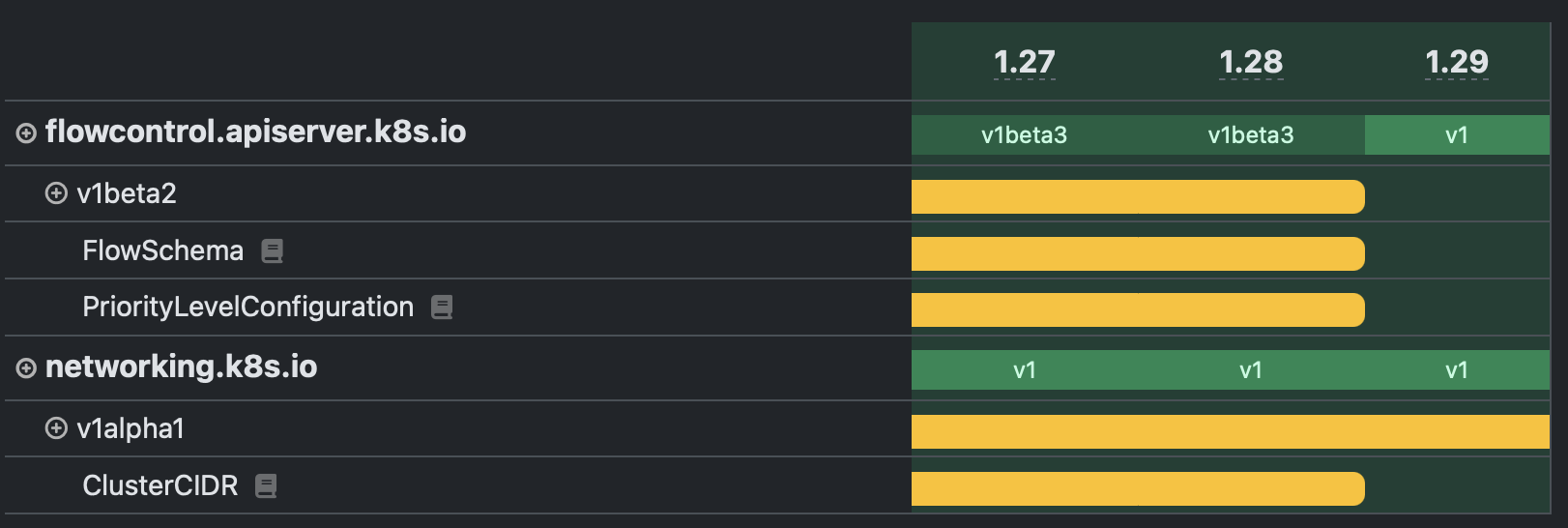
kube-api.ninja is also helpful if you are interested in the evolution of APIs. Did you know that HorizontalPodAutoscalers existed as a resource type before Deployments? These days the Kubernetes APIs have stabilized a bit, but I wish I had this around during the extensions to apps migration days.
kubeconform
- Repository: github.com/yannh/kubeconform
The last (serious) entry on this list is kubeconform, which is extremely helpful in validating your Kubernetes manifests before applying them. It works great in tandem with helm by first rendering your Helm chart into YAML and then passing that to kubeconform to check for semantic correctness. This is how a simple CI pipeline will much improve your Helm chart’s development process:
helm template \
  --debug \
  name path/to/helm/chart | tee bundle.yaml
# run kubeconform on template output to validate Kubernetes resources.
# the external schema-location allows us to validate resources for
# common CRDs (e.g. cert-manager resources).
kubeconform \
  -schema-location default \
  -schema-location 'https://raw.githubusercontent.com/datreeio/CRDs-catalog/main/{{.Group}}/{{.ResourceKind}}_{{.ResourceAPIVersion}}.json' \
  -strict \
  -summary \
  bundle.yaml
This will help ensure that PRs changing your Helm chart still produce semantically valid Kubernetes resources, not just valid YAML.
kubeconfig-bikeshed
- Repository: github.com/embik/kubeconfig-bikeshed
Okay, okay, okay. This one is shameless self-promotion, so I’ll keep it short. If you struggle with juggling access to many Kubernetes clusters and you feel like multiple contexts in your kubeconfig no longer cut it, kubeconfig-bikeshed (kbs) might be for you. I’ve started writing it to replace my various shell snippets that I was using to manage access to Kubernetes clusters.
How many of the listed tools did you know already? Hopefully you found some new things to try out in your next troubleshooting session or CI/CD pipeline design.