Thinking, Fast and Slow (Daniel Kahneman)

Marvin Beckers

August 22, 2024

Categorized as book review

Thinking, Fast and Slow is a non-fiction book by psychologist Daniel Kahneman published in 2011, discussing the human decision-making process and the flaws that come with it. If I had to break it down to one sentence, the book challenges the perception of humans as purely rational beings (“econs”) by describing various mechanisms of the human mind that can produce inconsistent results.

Kahneman died earlier this year after working on the research described in the book for decades and reaching highest academic acclaim, being dubbed “godfather of behavioral economics”. I had known about Thinking, Fast and Slow before, but his death prompted me to add the book to my reading list and I finally picked it up in July.

Summary

Each of the five parts of the book looks at different aspects of decision-making mechanisms observed by Kahneman.

It begins with introducing two systems involved in our decision-making process: System 1, which operates subconsciously and is responsible for reflexive and intuitional decisions, and System 2, which is conscious and what we consider as ourselves when we think. The case for these two systems (which are mostly described as actors throughout the book to make it easier to conceptualize them) is rather compelling.

They both have strengths and weaknesses (e.g. system 1 can handle averages and peaks well, but is not good at handling sums; system 2 is much better at dissecting problems, but is “lazy” and while tasked with validating inputs from system 1, tends to make mistakes at that verification process) and interlace to come up with decisions we make every minute.

Concepts

A (non-exhaustive) list of interesting concepts that the book proposes:

Substitution is a process in which a harder question is replaced with an easier question to answer the original question. This happens without the person realizing that they aren’t answering the original question but an easier one.

Intensity matching describes a more specific case of substitution: Transferring a value on one scale (e.g. your emotional response to a heartbreaking story) to another scale (e.g. a financial contribution to a good cause related to the prior story) to (intuitively) decide an appropriate value.

Regression to the mean is one of several examples where human intuition is beaten by statistics: We tend to see a particular good or bad day/event/occurrence as evidence of overall performance, but stasticially an outstanding event (e.g. a goalkeeper being able to catch every or none of the shots at the goal) is followed by an event closer to average. An outstanding game by the goalkeeper is more likely to be followed by a more average one but we tend to expect a similar outstanding game and are disappointed when it doesn’t happen.

Anchoring is when the context of a decision sets the stage by creating a reference point from which the decision-making process starts out. This is again a subconscious process: We are not aware it happens. But asking people to estimate something (e.g. a historical fact) above or below an arbitrary number supposedly changes their answers.

Prospect theory which is a little hard to put into a couple of sentences. If I’d still try I would describe it as following: It’s a counter-argument (or rather, an amendment) to utility theory which postulates that (rational) agents maximize the utility of a decision. Prospect theory however claims that human decision-making is more complex and driven by divergence from a status quo (instead of absolute numbers), by diminishing sensitivity (stark differences are more impactful) and by loss aversion (losses have a higher impact than gains).

Expert Intuition

A very fascinating part of the book is the discussion of expert intuition. Kahneman worked on this topic with Gary Klein, who Kahneman describes as somewhat adversarial in the book. Kahneman’s synthesis of their opposing positions is: Expert intuition can only be skilled (as in: have a higher chance of being correct than a coin toss) in sufficiently predictable environments with immediate feedback loops. A firefighter (the example from the book) can pick up on non-obvious cues that forebode escalations because they have experienced similar events in the past. Intuition is basically just memory retrieval and pattern matching.

A stock picker however cannot learn to correctly forecast stock performance because the stock market is a “zero-validity” environment. And the book makes an even bolder claim: If you actually validate stock picking skills, you will encounter minuscule differences from pure chance. In a market in which ETFs seem to perform more consistently than manually picked stocks, this rings true. Remarkable – according to the book – is the cognitive dissonance when confronted with such performance metrics: The results are ignored and everyone carries on as if they had the skills that statistics have been unable to verify.

Conclusion

There are many more topics discussed in great detail in the book, but the conclusion it draws is clear: Human decision-making is driven by evolutional features that were of great help surviving difficult conditions, but they have not fully adjusted to the kind of decisions that humans need to make in the present day. The “rational agents” described by economic theory (the book calls them “econs”) do not exist in that shape and form, and humans are susceptible to flawed heuristics and biases.

The conclusion of the book draws a line from all that to what it means for policy making. The gist is that humans do not necessarily need to be “kept from harm”, but they need to be provided with decision-making input in formats that do not skew their perception. Marketing departments and public opinion drivers are aware of psychological research as described in this book, and Kahneman adopts the standpoint that policy makers need to be aware of biases and heuristics and should set policies that enforce neutral information to minimize framing, anchoring, biases or similar flaws in decision making.

Review

Somewhat surprisingly, reading this book has been a breeze. The topic is difficult (and should be dry, given the amount of discussion of research results), but the writing style made it easy to follow the threads spun by Kahneman, much more than I anticipated. It’s certainly a book that requires breaks to process and think about the concepts, but I finished it way faster than was reasonable for me.

A criticism leveled against the book is that the countless studies it references are caught up in the replication crisis of social sciences – the inability to reproduce them successfully or consistently. That’s a very valid point, most of the book’s claims only work if the described behaviour can be considered somewhat universal. It becomes moot if humans simply behave differently.

To a layperson, a lot of the book makes intuitive sense (but I just learned to not always trust intuition) and the examples seem to create the cognitive knots described in the book, even when I was aware that I’m going to encounter a logical fallacy. Observing myself working through those has been a fascinating experience. The book provides some underpinning to fuzzy beliefs I’ve held before but had trouble articulating (e.g. that status quo plays a huge role in decision making) which makes it both compelling and precarious (as it makes me prone to confirmation bias).

Software engineers can – in my opinion – learn from this book, in particular from the review of expert intuition. We all know situations in which expert intuition is desired (say, story point estimations) but the responses are usually extremely poor and there is basically not feedback loop. And remarkably, those situations share some other characteristics with the case made in the book: A whole industry feels that story point estimations are bordering on the useless, but a competing (business) interest creates a cognitive dissonance we have simply accepted. If we accepted that human decision making is simply not up to the task, we could maybe stop wasting time on it.

Describing humans as purely rational beings has also been the theoretical underpinning for predatory, self-serving ideologies, and only if we acknowledge that these foundations are extremely shaky we can put policies in place that improve human well-being and social constructs.

Overall, the book highlights aspects we all can pay attention to while making decisions and even proposes processes to insulate organizations and societies from decision-making mistakes. Stopping ourselves in our tracks to review a decision and test it for biases makes universal sense, even if the models described in Thinking, Fast and Slow are not as useful or correct as they are made out to be. I’d strongly recommend this book to anyone interested in decision-making processes and introspection, but it should be taken as a (likely flawed) attempt at modelling of, not an exhaustive guide to, human behaviour.
Kubernetes Homelab #1: Raspberry Pi Setup

Marvin Beckers

May 9, 2024

Categorized as kubernetes and homelab

I like to tinker with Kubernetes in my free time and I’ve always wanted to host some services for myself. Vaultwarden is one of those services since I’d like my passwords to be stored away where I can see them. Up to now this was running on an old Intel NUC that I stashed away in my apartment.

Years ago I had been using Raspberry Pis (generation 1 or 2, maybe?) for hosting some fun projects (e.g. a TV antenna receiver attached to a Raspberry Pi to watch TV – when that was still a thing).


This post is part of a blog post series describing my Kubernetes Homelab.


Now I wanted to try again because cloud is expensive, Kubernetes can be quite fun and I hadn’t tinkered with hardware in a good while. So my goal was to get a setup that

  1. had three nodes to make sure Kubernetes made sense. A single node isn’t really a cluster.
  2. provided its own storage. A NAS is expensive and a single point of failure, so “hyperconverged” (is that word still in use at all? it was the big hype in on-premise hardware ten years ago) was the way to go.
  3. didn’t boot from an SD card. Maybe this is fine now but I had many corrupted SD cards I needed to reformat back in the days. I wanted my machines to boot from a disk.
  4. used power over ethernet (PoE) to reduce the cables needed for powering the setup.
  5. allowed to expose services to me as its only user with valid TLS certificates and hostnames.

The blog post series that this post kicks off will map out my journey with getting my homelab up and running and document any steps and problems along the way.

Note: All commands in this post are executed as root. You can either prepend them with sudo or open a root shell once with sudo -i.

Hardware

The core of the setup is comprised of three Raspberry Pi 5 B with a 2.44 GHz ARM Cortex-A76 Quad-Core-CPU and 8GB of RAM. These machines are barely comparable to the original Raspberry Pi. They are quite the workhorses!

To power the Raspberry Pis over ethernet via PoE I bought a TP Link TL-SG1005P (a 5-port gigabit desktop PoE+ switch).

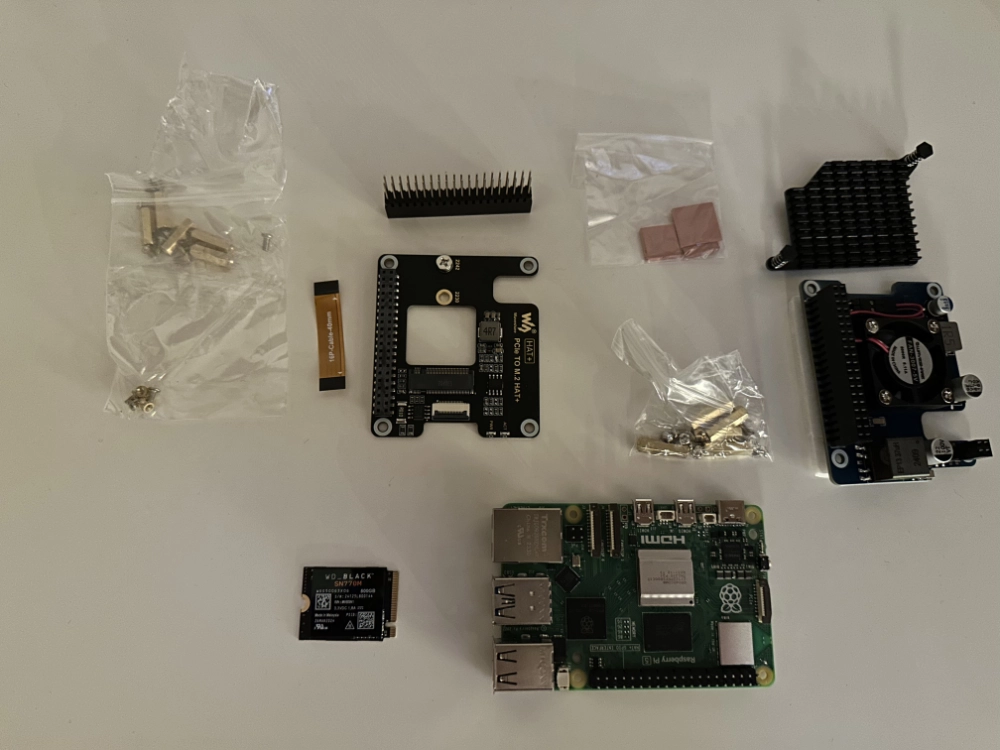
I ended up using the following HATs for the three Raspberry Pi 5 B, bought from Amazon:

Waveshare is a Chinese manufacturer of electronic components for microcontrollers and embedded boards. The choices for Raspberry Pi 5 PoE HATs is quite limited at the moment. An official PoE HAT had been announced, but updates have been rare and search results mostly end on a post half a year old. Jeff Geerling reviewed this PoE HAT (see his blog and the GitHub issue) and overall it looked promising.

Raspberry Pi 5 and both HATs.

M.2 SSD

I went with Waveshare’s PCIe to M.2 HAT+ to make sure the two HATs would work with each other. However it seems to be hit or miss whether an M.2 SSD is going to be supported by the HAT or not. I started the setup with a Transcend TS256GMTS430S (a 256GB M.2 SSD), but the disk would not get recognized, even after following all troubleshooting steps. After some back and forth with Waveshare support I got the recommendation to use a Western Digital WD BLACK SN770M, which worked like a charm.

As is often the case with these kind of manufacturers, documentation is sparse. It was more or less impossible to figure out why the Transcend SSD wasn’t recognized – some sources were talking about the Raspberry Pi PCIe not working with a specific on-board controller on M.2 SSDs, but as far as my Google research suggested this SSD didn’t seem to be using that controller. In the end things worked out by exchanging hardware, thus it doesn’t seem a good idea to combine this particular HAT with Transcend M.2 SSDs.

Assembly

Overall assembly worked fine but required some careful strength applied at the right times. I assembled the system with the PoE HAT being attached to the Pi first as the lower layer and then added the PCIe to M.2 HAT on top of it.

Beware: It's possible to mount the heat sink coming with the PoE HAT the wrong way (either there are no markings or I missed them) and it's really not built to be removed to remount it. So make sure you mount it the right way (the longer edge should be on the side of the SD card slot), otherwise you won't be able to attach the PoE HAT.

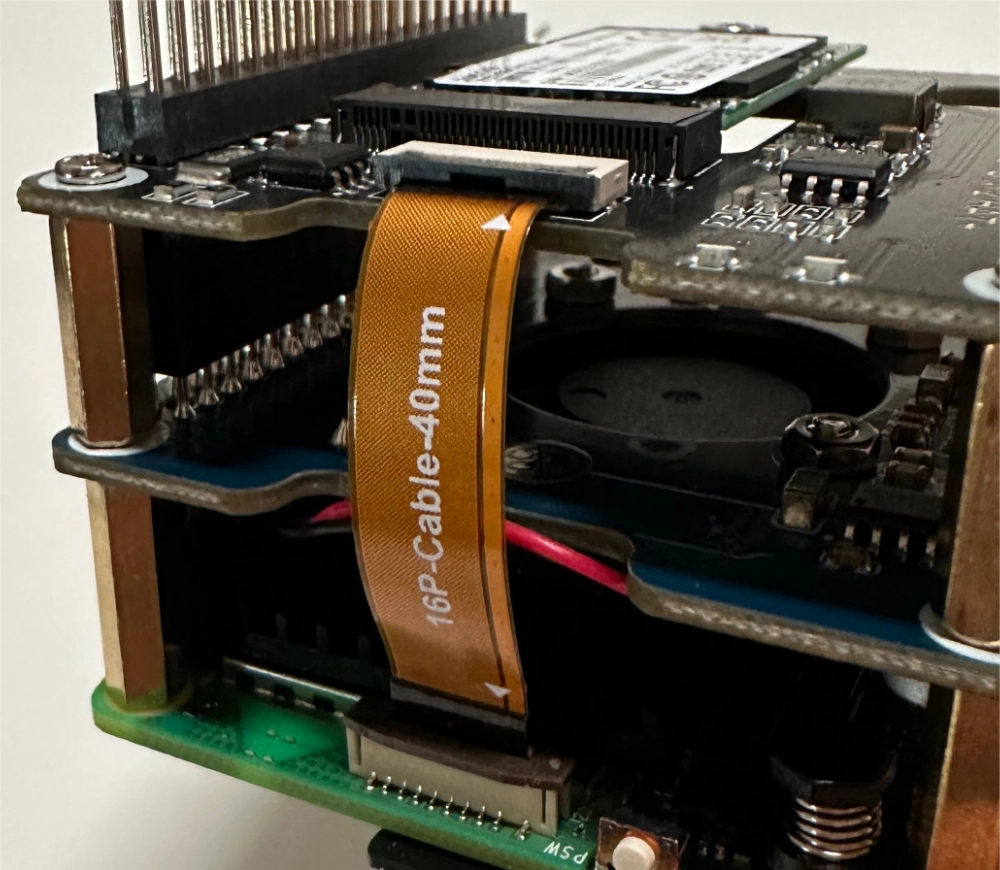
The cable provided with the PCIe to M.2 HAT to connect the Pi’s PCIe slot to the HAT was just long enough to work in this stacked setup. Connecting it properly on both ends was a bit fiddly (especially on the Pi side – the HAT side has a very solid mechanism to hold the cable in place), tweezers came in very handy.

Cable to connect PCIe slot to M.2 HAT (with the non-functional SSD mounted).

System setup

The best choice of OS on the Raspberry Pi currently seems to be Raspberry Pi OS. It’s based on Debian, which is great because KubeOne (disclaimer: I’m a contributor to it and it’s developed by my employer, Kubermatic) has (limited) support for creating Kubernetes clusters on it.

Before booting from the M.2 SSD a quick detour via a bootable USB stick was needed. I used the Raspberry Pi Imager to write the latest Raspbbery Pi OS “lite” (no desktop environment included) to a spare 32GB USB stick. One of the important customizations here is enabling SSH and adding a SSH public key.

Plugging in the USB stick and powering on the Raspberry Pi by connecting the ethernet cable started Raspberry Pi OS from the USB stick. I used this transient setup to check on the M.2 SSD disk and prepare it to become the boot device. To find its IP address I signed into my home router’s web UI, found the newly connected device and made sure to configure the device to always receive the same IP address from the router’s DHCP server.

Setting up static IPs here is actually pretty important for the Kubernetes setup later. Kubernetes doesn't really expect nodes to change IP addresses, and all three of my Pis are going to be control plane nodes; this "rule" applies especially to the control plane and might otherwise result in breaking the cluster.

After connecting via SSH I had to make sure the M.2 SSD was actually working. That required configuration so that the Raspberry Pi would start with NVMe support which can be added by editing /boot/firmware/config.txt and adding the following line:

dtparam=nvme

On one of the Pis also refused to boot from NVMe (in one of the later steps) before updating its firmware. To do so I ran the following commands (still booting from the USB stick):

$ apt update
$ apt upgrade
$ rpi-update

For this and the dtparam addition to take effect a reboot is required. Afterwards, the SSD showed up as block device:

$ lsblk
NAME        MAJ:MIN RM   SIZE RO TYPE MOUNTPOINTS
sda           8:0    1  28.7G  0 disk
|-sda1        8:1    1   512M  0 part /boot/firmware
`-sda2        8:2    1  28.2G  0 part /
nvme0n1     259:0    0 465.8G  0 disk

At this point the SSD was showing up so I was able to prepare it to become the system’s boot disk. First of all I needed a Raspberry Pi OS (64bit) lite image on the system:

$ curl -O https://downloads.raspberrypi.com/raspios_lite_arm64/images/raspios_lite_arm64-2024-03-15/2024-03-15-raspios-bookworm-arm64-lite.img.xz
$ unxz 2024-03-15-raspios-bookworm-arm64-lite.img.xz

Next step was writing the image to disk:

$ dd if=./2024-03-15-raspios-bookworm-arm64-lite.img of=/dev/nvme0n1

This resulted in a partition table on /dev/nvme0n1 so the output of lsblk changed:

$ lsblk
[...]
nvme0n1     259:0    0 465.8G  0 disk
|-nvme0n1p1 259:1    0   512M  0 part
`-nvme0n1p2 259:2    0   2.1G  0 part

OS modifications

The OS written to disk did not include modifications to access after booting it. I skipped the Raspberry Pi image writer this time and did the modification in a chroot environment:

$ mount /dev/nvme0n1p2 /mnt
$ mount /dev/nvme0n1p1 /mnt/boot
$ chroot /mnt

The /boot/config.txt file in this environment also required dtparam=nvme since it was separate from the file (on the USB stick environment) previously adjusted.

Next up was changing the hostname:

$ echo "rpi-01" > /etc/hostname

To make sure that DNS resolution for its own name was working properly a slight modification to /etc/hosts and ensuring that the entry for 127.0.1.1 included the new hostname was necessary:

127.0.1.1		rpi-01 raspberrypi

For access to the system after boot I configured the existing user pi to have my SSH key. In addition /boot/ssh tells the OS to start sshd on boot.

$ mkdir -p /home/pi/.ssh
$ echo "ssh-ed25519 AAAA[...] embik" > /home/pi/.ssh/authorized_keys
$ chown -R /home/pi/.ssh pi:pi
$ touch /boot/ssh

I wanted to rename the pi user to embik on first boot by setting /boot/userconf.txt. Unfortunately you always need to pass a hashed password which can be generated by openssl passwd -6. Part of the post-boot steps was going to be removing the set password anyway.

$ echo "embik:$6$..." > /boot/userconf.txt

Everything on the NVMe disk was ready, so the only thing left there was to leave the chroot environment and make sure the disk was cleanly unmounted.

$ exit
$ umount /mnt/boot
$ umount /mnt

Boot from NVMe

Last step was changing the boot order to make sure the next time the Raspberry Pi started, it would boot from my M.2 SSD.

$ rpi-eeprom-config --edit

I changed BOOT_ORDER to 0xf416 which attempts boot from NVMe and falls back in case the NVMe disk isn’t bootable. In addition this configuration needed PCIE_PROBE=1. Now everything is set and ready to reboot the system into the M.2 SSD.

A curious observation from my first setup was that while 0xf416 should describe the boot order “NVMe -> SD card -> USB stick” (see Raspberry Pi documentation), my Pi would not successfully boot from the still inserted SD card when my NVMe disk wasn’t formatted properly. I had to use an USB stick to recover the system.

Post-boot steps

Once rebooted, ssh became available after a couple of seconds (booting from the M.2 SSD makes it essentially another system, so ssh-keygen -R was necessary before being able to connect). The system indeed booted from the NVMe disk and mounted its root partition:

$ lsblk
nvme0n1     259:0    0 465.8G  0 disk
|-nvme0n1p1 259:1    0   512M  0 part /boot/firmware
`-nvme0n1p2 259:2    0 465.3G  0 part /

To make sure that no one would be able to use password-based SSH authentication I deleted the user’s password:

$ sudo passwd -d embik

Two last things were necessary to prepare the Pi for Kubernetes: Disabling swap and enabling the memory group. The Raspberry Pi OS seems to have some special swapfile generation (swap isn’t mounted in /etc/fstab as usual), so this seems to be the way to disable swap on next boot:

$ systemctl disable dphys-swapfile.service

By default Raspberry Pi OS doesn’t enable the memory cgroup, which is a hard requirement for Kubernetes. That can be adjusted in /boot/firmware/cmdline.txt by appending two additional boot parameters (requires a reboot):

cgroup_enable=memory cgroup_memory=1

Rinse and repeat two more times to get all three Pis set up correctly.

Next up

Hardware is all set up now! The next post will discuss setting up Kubernetes on these Raspberry Pis with KubeOne and keepalived. Stay tuned and subscribe to my blog via RSS to not miss any upcoming posts.

Sources